
Live Image (CCTV) Widget1.7 - Get APK
You'll be able to download in few seconds.
Publisher Description
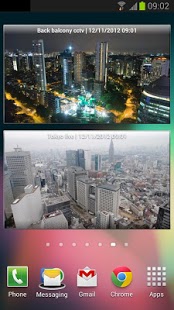
A home screen widget which provides an automatically refreshed view of web based images (various auto-refresh times are available). Developed originally for monitoring CCTV or webcam images Live Image Widget can be used for a variety of other purposes where an image URL is dynamically produced.
- Support for Gingerbread (fixed size widgets) and Honeycomb and above (resizeable widgets)
- Unlimited number of widgets and image definitions
- Easy-add image URL via 'Share...' in Chrome / Browser
- Auto refresh between six hours to five minutes (optional, can also be disabled when not on Wifi)
- Three color themes and glass appearance (optional)
- Short-term caching of images to reduce network load (10 seconds)
- Time stamp (optional)
- Holo theme on ICS / JB
On-widget controls:
- Manual refresh
- Previous / Next image
- Full-screen mode with pinch-zoom
- Save current image to gallery
- Settings
IMPORTANT NOTES
Live Image Widget caches any loaded image for TEN (10) seconds to ensure multi-widget performance and reduce network load. This means that repeatedly pressing the refresh button will only cause a refresh every ten seconds.
To use Live Image Widget outside of your local network you must ensure that the URLs entered are accessible from the Internet (that is 'through' your router / firewall), this can also be a security risk if you do not properly obfuscate your external URLs.
About Live Image (CCTV) Widget
The company that develops Live Image (CCTV) Widget is Gadget Juice. The latest version released by its developer is 1.7.
To install Live Image (CCTV) Widget on your Android device, just click the green Continue To App button above to start the installation process. The app is listed on our website since 2013-04-11 and was downloaded 0 times. We have already checked if the download link is safe, however for your own protection we recommend that you scan the downloaded app with your antivirus. Your antivirus may detect the Live Image (CCTV) Widget as malware as malware if the download link to com.gadgetjuice.liveimagewidget is broken.
How to install Live Image (CCTV) Widget on your Android device:
- Click on the Continue To App button on our website. This will redirect you to Google Play.
- Once the Live Image (CCTV) Widget is shown in the Google Play listing of your Android device, you can start its download and installation. Tap on the Install button located below the search bar and to the right of the app icon.
- A pop-up window with the permissions required by Live Image (CCTV) Widget will be shown. Click on Accept to continue the process.
- Live Image (CCTV) Widget will be downloaded onto your device, displaying a progress. Once the download completes, the installation will start and you'll get a notification after the installation is finished.
Program Details
System requirements
Download information
Pricing
Version History
version 1.7
posted on 2013-04-11
- Improved reliability of widget rotation on tablets,- New ICS/JB style launcher icon,- Preliminary support for Jelly Bean 4.2 lock screen widgets
version 1.7
posted on 2013-04-11
Several fixes and updates
Disclaimer
External Download
We do not host Live Image (CCTV) Widget on our servers. We did not scan it for viruses, adware, spyware or other type of malware. This app is hosted by Galad and passed their terms and conditions to be listed there. We recommend caution when installing it.
The APK Download link for Live Image (CCTV) Widget is provided to you by apps112.com without any warranties, representations or guarantees of any kind, so access it at your own risk.
If you have questions regarding this particular app contact the publisher directly. For questions about the functionalities of apps112.com contact us.
